What it looks like
Features
A project in one click
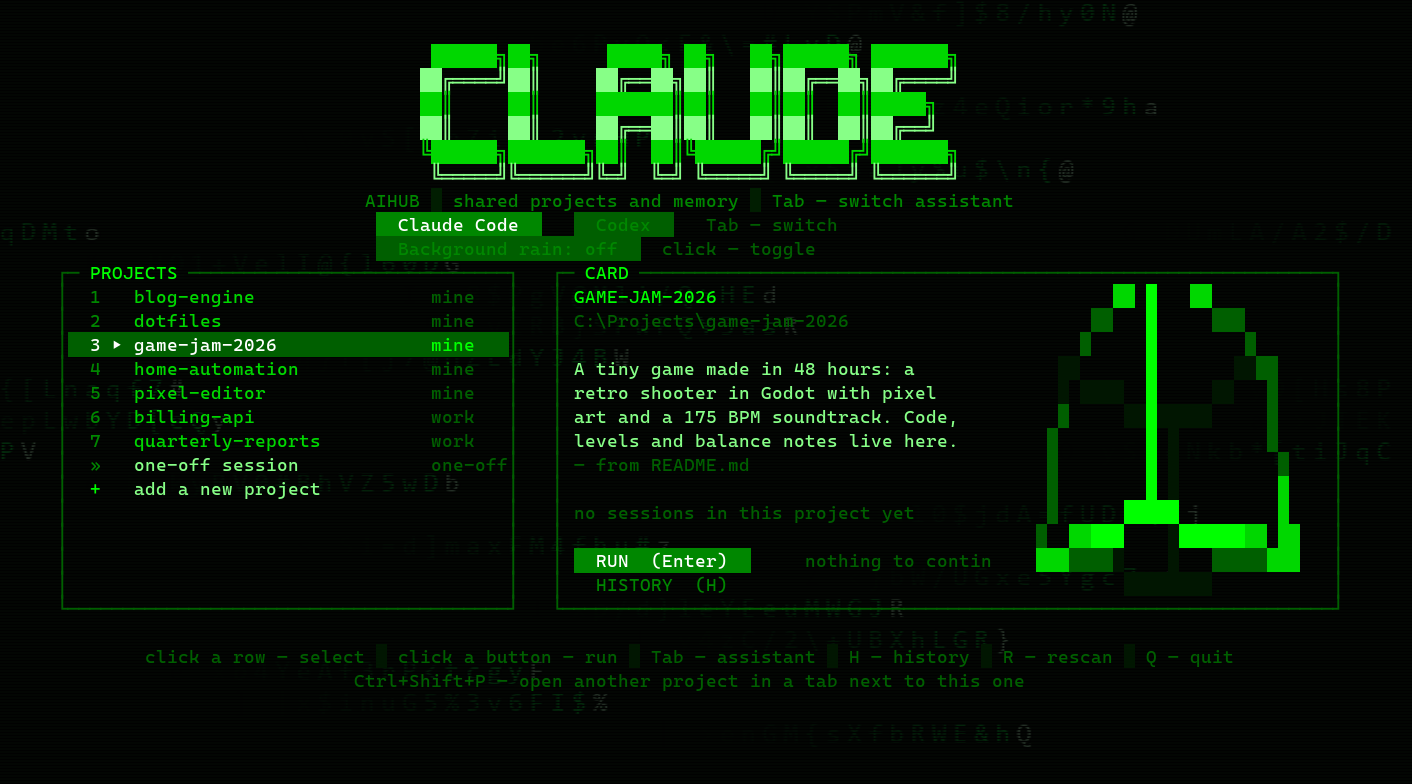
Folders from your project roots on the left; on the right a card with the description from CLAUDE.md or README, when the last session was and what was asked there.
Claude or Codex — Tab
A big banner names the selected assistant. It starts right inside the menu window; exit it and you are back in the list.
Hand a conversation over
Pass the transcript to the other assistant: Codex continues what Claude started, and vice versa. Both histories live in one list.
What continuing costs
The card shows how many thousand tokens an old session will resend with every reply — and hints when starting fresh is cheaper.
One-off session
A quick question without a project: the assistant starts in your home folder, nothing gets created.
New project from the list
Pick a root, type a name — the future path and any problem with the name show up under the field before anything is created.
Matrix background
Falling glyphs, a gradient and CRT scanlines. Animation is toggled with a button in the menu; a light still frame by default.
Keys in any layout
Alt+V pastes an image into Claude Code even under a non-Latin layout, Ctrl+V is a normal paste, Ctrl+Shift+P opens another project in a tab.
Status line and toast
Optional: model, git branch and your 5-hour and weekly limits at the bottom of Claude Code; a popup in the corner when Claude is done.
Install
- Install WezTerm, Python 3.10+ and the assistants you use:
winget install --id wez.wezterm
npm i -g @anthropic-ai/claude-code
npm i -g @openai/codex
- Clone and run the installer — it asks for the language and where your projects live:
git clone https://github.com/alexdef228/aihub-terminal-skin.git
cd aihub-terminal-skin
python install.py
- Open the AIHUB shortcut on your desktop. Extras:
# Claude Code status line and popup
python install.py --statusline --hooks
Your previous .wezterm.lua and settings.json are kept next to them with an aihub-backup suffix. Remove everything with python install.py --uninstall.
Keys
| Key | What it does |
|---|---|
| ↑ ↓ or W S | choose a project; mouse and wheel work too |
| Enter | new session in the selected project |
| C | continue the last session (or take it over from the other assistant) |
| H | shared session history of Claude and Codex |
| Tab | switch Claude Code / Codex |
| R · Q | rescan folders · quit |
| Ctrl+Shift+P | open another project in a new tab |
| Ctrl+Shift+D / E | split the window side by side / top and bottom |
Questions
Does it work on macOS or Linux?
Not yet: the menu reads keyboard and mouse through the Windows console and cleans up tab processes via WinAPI. The WezTerm skin itself could be ported.
What happens to my WezTerm config?
The installer saves it as .wezterm.lua.aihub-backup-<time>, and --uninstall puts it back.
Where do my conversations go?
Nowhere. The menu reads the native Claude Code and Codex histories on your disk; to hand a conversation over it writes a Markdown copy into the app folder (session-memory, never committed).
Which languages does it speak?
English and Russian — the menu, installer, status line and popup. The installer asks; later change "language": "en" in settings.json or run python install.py --lang en. Without the setting it follows the Windows display language.
Is this official?
No. An independent project, not affiliated with Anthropic or OpenAI.